Friday, March 8, 2013

CVS FREE AND CHEAP (Week 3/10/13-3/16/13)

CVS Ad Match-up Deal week 3/10/13


Coupon Color Decoder:
~Pink = Facebook Coupon, you'll have to have a Facebook account to print these IPs!
~Green = ibotta offers
~Purple = Rebates
~Light Blue = Scanner coupon or CVS Retailer Coupon, you'll know it's a CVS coupon because the barcode will always start with the number 4!
~Red = These are general coupons, they could be from an insert, a tearpad, a booklet, peelie, or an IP and start with the number 5 or 9.

FREE

~ Get $0.99 wyb Gold Emblem jelly beans 7oz $0.99 Limit 1
Free after ECB


~ Get $2 ECB wyb Di-Gel liquid 12oz $5 Limit 1
$3/1 coupon in Sunday paper
$3.50/1 di-gel Antacid & Antigas Liquid (SS 1/20)
*exp. 3/15

Free + up to $0.50 MM after coupon/ecb


~ Zyrtec 24-hr. tablets 5 ct. BOGO @ $6.79 per cvs.com
$3/1 Zyrtec or Zyrtec-D product, ets (Found at CVS, One sheet )
$4 off Any Zyrtec, ets (Minute Clinic $9 Cough & Cold Booklet)

2 x Free or $0.79 after coupons


~ Get $4 ECB when you spend $10 on any Almay cosmetics (excludes clearance) Limit 1
$5/2 Almay Cosmetic Products, ets IP : HERE (direct)
$3 off any Almay Color Cosmetics purchase, scanner coupon, printed week of 3/3

Scenario with a 20% off coupon:
Buy (2) x Almay make-up remover sticks or remover pads psa. $5.49-5.99
Use $5/2 mani, 20% off ($2.20-2.40), Pay $3.78-4.58, Get $4 ECB
Free + MM for the sticks or as low as $0.58 for the pads after coupon/ecb
*If you have the $3 scanner coupon, it turns into a MM!


CHEAP

~ Get $2 ECB wyb Edge shave gel 7oz Limit 1 psa. $3.49
$1/1 Edge shave gel or shave cream, 5.1oz+ (SS 3/10)
$1.50/1 Skintimate, Edge or Schick Hydro Shave Gel, excludes 2.75oz (peelie found at CVS)
BOGO Edge, up to $3 IP :
HERE

Free after peelie coupon/ecb or 2/$1.98 after BOGO coupon/ecb
*if you have a 20% off coupon, pay $2.58, Get $2 so 2/$0.58 after BOGO coupon/ecb, also YMMV on using the $1 coupon with the
BOGO coupon, it beeps.


~ Renuzit adjustables 7.5oz $0.88
B2G1 FREE Renuzit Adjustables, Max value $4.17 (RP 3/3) *limit 4 per trip, coupon not vaild with other coupons for the same item
3/$1.76 or $0.59 each after coupon


~ Get $3 ECB wyb Select Sundown or Ester-C $7.99 Limit 1
$3/1 Ester-C Tablet (RP 02/17/13) or HERE
$1.99 after coupon/ecb


~ Get $5 ECB when you spend $15 on Easter items and toys listed: Limit 1
Mars Easter Minis, M&M's 9-12 oz, Dove eggs 7.94-8.87 oz, solid chocolate bunny 4.5 oz or Hershey's assorted 8-15 oz 5/$15
$1 off New Snickers Peanut Butter or Mars Minis, 10 oz.+ scanner coupon printed week of 3/3
Scenario:
Buy (5) x Mars Minis = $15
Use (5) x $1/1 Mars Minis scanner coupons, Pay $10, Get $5 ECB
5/$5 or $1 each after coupons/ecb

FREE at Kroger

FREE at Kroger

Updated 3/8/13.

Here are all the items you can currently get at Kroger for FREE!

Altoids®


Carefree Liners (20-22 ct) – $1.00 (thru 3/16) 
Use $0.50/1 Carefree Product printable (doubles to $1.00)
Final cost is FREE!


Maruchan Yakisoba Noodles - $0.99 (thru 6/17) 
Use $0.50/1 Maruchan Bowl or Yakisoba from 02/10 SS (exp 5/31) (doubles to $1.00)
Final cost is FREE!


Nestle Nesquik Powder (7 servings) – $0.99 - $1.09 (Reg Price) 
Use $0.50/1 Nestle Nesquik Powder or Syrup from 02/17 RP (exp 4/14) (doubles to $1.00)
Final cost is as low as FREE!


Pom Wonderful Juice (8 oz) - $1.00 (thru 3/16) 
Use $0.50/1 POM Wonderful Bottle from 02/10 SS (exp 3/12) (doubles to $1.00) Or
$0.50/1 POM Bottle from 12/02 SS (exp 3/31)
Final cost is FREE!

Monday, March 4, 2013

SavingStar Grocery Ecoupon


What is SavingStar?
SavingStar is the first and only national, fully-digital grocery eCoupon rewards service. There is nothing to clip and nothing to print. Finally!

CLICK HERE TO REGISTER 

SavingStar.com saves you money on groceries. 100% digital eCoupons


Nothing to clip, Nothing to Print! Save on Groceries at SavingStar.com


How do I use SavingStar eCoupon rewards?
SavingStar is a paperless way of saving with eCoupons that link to your existing grocery and drug store loyalty cards. Here’s how it works:
Join SavingStar for free and register your grocery and drugstore loyalty cards on SavingStar. (for example, your CVS ExtraCare card, your Stop & Shop card, etc.) Then, click the eCoupons you want and we’ll link them to all of your registered store cards. When you use your card at checkout like you normally do, your savings are automatically added to your SavingStar account within 2-22 days depending on when the store sends us the purchase data. (Note: the savings are not given at checkout in the store and they are not printed on your receipt). Once your accumulated savings in your SavingStar account reach $5, you can pick your payout from a deposit into your bank or PayPal account, an Amazon gift card, or a donation to American Forests. It’s that easy!


If I have more than one store loyalty card registered, will the eCoupons load to all of them?
Yes! SavingStar eCoupons will load to all of your registered cards. When you buy the qualifying product(s) at any of the stores, we will reward you for the purchase. Note that some eCoupons are designated to be available only at specific retailers. These will be marked with a yellow banner that indicates where they may be used (For example – Only at: CVS).


How do SavingStar One or Many offers work?
SavingStar’s One or Many offers give you a great new way to save. You can make your purchases in one trip or many at any participating store. Here’s how it works:
1. Buy in one trip or many – First, activate the offer. Then buy in one trip or many at any store where you have a card registered with SavingStar. Make sure to scan your card every time you shop.
2. Track your progress - Track your progress on SavingStar.com. You will receive your savings when you reach your goal. We’ll also email you after each purchase and when you’ve earned your reward. Progress & savings will post to your account within 2-22 days of purchase.
Note: Like other SavingStar offers, your grocery bill will not change – when you receive your savings they will appear in your SavingStar account.
For One or Many offers marked ‘One time use only’, you are only eligible to receive one reward for the offer.


Can I get rewarded more than once if the same One or Many offer appears on SavingStar.com, Facebook or elsewhere?
You are only eligible to be rewarded once for the same One or Many offer.


I activated a One or Many offer on Facebook. How do I keep track of my purchases?
There are two ways to keep track of your purchases for a One or Many offer on Facebook:
    • Facebook – The Facebook page where you activated the offer will show a progress bar indicating how much you have purchased and how much remains before you receive your reward.


Can I view or activate One or Many offers on the SavingStar mobile app?
Currently, you can activate One or Many offers on SavingStar.com or Facebook. One or Many offers will be coming to SavingStar’s mobile apps in the near future.

 Why did most of my redemptions from a recent shopping trip post, except for my purchases relating to a One or Many offer?
Currently, One Or Many offers can sometimes take longer than the process for our normal eCoupons, so it may take another day or two for those savings to show up in your account. If your reward for the One or Many offer doesn’t post within a few days, please submit a support ticket so that one of our representative can look into this for you.

 I bought a product but didn’t get my savings. How come?
Savings are not given when you checkout at the store, instead they are deposited into your SavingStar account typically within 2-14 days after your purchase, depending upon how quickly the store sends us purchase data. Some stores can take up to 22 days to post your savings. Don’t worry! We’ll send you an email to alert you when your savings post.

 I bought a product before the offer expired, but my savings have yet to post. Will I still get my savings?
Yes you will! Once the store sends us the purchase data, the savings will post to your account and we’ll send you an email to alert you.

 If an eCoupon requires me to buy 2 or more of a product, does it need to be in the same transaction?
Yes, it does need to be in the same transaction. The exception is for offers labeled “One or Many” and clearly state on the offer itself “Buy in one trip or many.”

 My grocery store is listed as a participating store but doesn’t have a loyalty card. How does this work?
Please click here to learn how to use SavingStar if you shop at Albertsons Market, Farm Fresh, Festival Foods, Hannaford, Hy-Vee, King Kullen, Raley’s, Redner’s, Roche Bros., Shoppers, Stater Bros., or Sweetbay.

 Does it cost any money to sign-up or to save money with SavingStar?
SavingStar is FREE to use.
(Please note if your account is inactive for 12 months in a row, we assess a $1.99 monthly fee only against savings in your SavingStar account. However, it is easy to keep your account active! To be considered active you must only do one of the following once per year: activate an offer, redeem an offer or pick a payout. We will never send you a bill for using SavingStar and we do not charge your credit card – and we never ask for your credit card number).

 What if I didn’t receive the email with my Amazon.com Gift Card code?
The email containing your Amazon.com gift card code should come from “savings@savingstar.com” within 48 hours of your request. Make sure to check your spam folder for the email if it isn’t in your inbox. We highly recommend adding this address to your safe senders list or contact list, so future emails will arrive in your inbox. If you still didn’t receive your code, please use our contact us page and we will help you out.

 Does SavingStar offer iPhone® or Android® apps?
Yes! Click here for the SavingStar iPhone® app and click here for the SavingStar Android® app. These apps allow you to choose eCoupons while on the go – including while you are shopping – and also help you remember which eCoupons you activated online.

 Which stores participate in SavingStar?
Nationwide, over 24,000 stores participate in SavingStar, representing over 100 retail chains. Click here to see a list of retailers. If your favorite store is not listed as a participating retailer, please let them know that you would like them to join SavingStar!

 How often are new eCoupons available?
SavingStar typically offers new eCoupons every Thursday, although new eCoupons may become available at any time.

 When and how will I know that I’ve received my savings?
All savings will be posted to your SavingStar account within 2-22 days, allowing you to track exactly how much you’ve saved over time. We’ll also send you an email to alert you when your savings post.

 Are SavingStar eCoupons doubled by retailers?
SavingStar eCoupons are not doubled.

 Do SavingStar eCoupons stack with in-store discounts or manufacturer’s coupons?
SavingStar eCoupons will work whether or not you combine them with other services’ coupons, but they are not intended to be used this way. Generally, manufacturers state that it is against their policies for shoppers to redeem more than one manufacturer’s coupon for the same purchase. Using in-store coupons in combination with SavingStar eCoupons is not a problem. Using coupons from other services in combination with a SavingStar “One or Many” deal is not a problem.
In the future, we may implement mechanisms to limit the combination of SavingStar eCoupons with other manufacturer coupons.

 
I’m a member of Upromise and see that its Grocery eCoupons are powered by SavingStar. Can I participate in both Upromise and SavingStar?

Yes. SavingStar provides the eCoupons for the Upromise service. You may register for both the Upromise and SavingStar, including registering your same store loyalty cards in each service. However, you may only activate a particular eCoupon in one service during a single promotion period. In the future, you’ll see SavingStar powering other rewards services as well.

 
What if I still have questions?

We’re here! Please submit your question on our contact us page and we’ll do our best to help you out.

 How do I close my account?
While we’d love to have you stay and use SavingStar’s service, you can request to close your account on our contact us page. Please give us feedback so we can help improve our service.

Sunday, March 3, 2013

CVS Coupon Policy


CVS Coupon Policy

*You are allowed to use (1) manufacturer and (1) CVS coupon per item.
*You may also use ExtraCare Bucks towards your purchase and $ off your order coupons.
*CVS accepts internet printable coupons.
*You can use a B1G1 Free coupon in a B1G1 Free sale.
*CVS will issue rainchecks on ECB items.

The ExtraCare Bucks Program

CVS’s ExtraCare Bucks (ECB) program pays you in ExtraCare Bucks when you purchase certain items. ExtraCare Bucks print at the register after you make a purchase and you can immediately use them to purchase other items at CVS. They do have expiration dates – generally giving you 4 weeks to use them. There are some exclusions such as stamps, gift cards, alcohol, tobacco, lottery, money orders, pre-paid cards, prescriptions, and special order Home Health Care items, including footwear. etc. ExtraCare Bucks are another way for manufacturers to incentivize shoppers to purchase their products.

How Do I Start?

In order to start earning ExtraCare Bucks (ECBs) you need to apply for a CVS rewards card that you can keep in your wallet or your key-chain. You will need to have your card scanned prior to making any purchases.
Look for items that are advertised in the weekly ad as offering ExtraCare Bucks on your purchase. Some will be for buying a very specific product … (Get $3 ExtraCare Bucks WYB Colgate for $3). Others will be when you meet a certain threshold… (Get $3 ExtraCare Bucks WYB $15+ in Revlon Cosmetics).
There are both weekly ExtraCare Bucks deals that you’ll find in the weekly ads and monthly ExtraCare Bucks Deals that you will find in the store.

Limits on Extra Care Bucks

There will be a limit on how many ExtraCare Bucks you can earn on each deal and that limit will be in the ad and tracked by your card. If the limit is (2) you will only earn ExtraCare Bucks on (2) purchases of that item. You can however buy them in one transaction if you choose, however you will earn an ExtraCare Buck that is for 2x the amount you were to earn, not (2) smaller Extra Care Bucks. Lets take a look at an example…
Get $3 ExtraCare Bucks WYB Colgate for $3 (limit 2)
If you do this deal 2x in separate transactions you will earn (2) $3 ExtraCare Bucks
If you do this deal 2x in one transaction you will earn (1) $6 ExtraCare Buck
This may not matter to you but if all you wanted to purchase immediately following that deal was an item for $3.50 you would be better off having a $3 ExtraCare Buck to spend than a $6 Extra Care Buck to spend.

What are Extra Bucks Rewards?

In addition to the regular ExtraCare Bucks you also earn Extra Bucks Rewards for making purchases in the store. You’ll earn 2% back with every purchase in-store and online at CVS/pharmacy and (1) Extra Buck for every 2 prescriptions purchased in-store and online at CVS/pharmacy. These special rewards will print out quarterly on your receipt or at the Coupon Center, located in the store.

What are CRT’s?

CRTs are Coupon Register Tape coupons that print after your receipt or in the Coupon Center located in most stores. These are store coupons and are often based on your past purchases.

Is there an order I should hand in my coupons?

*If you have a $/$$ coupon like $4/$20 always give those FIRST.
*Hand over manufacturer and CVS coupons next.
*Lastly hand over any ExtraCare Bucks you are using to pay.

Can I use ECBs to pay for another item that produces ECBs?

Yes absolutely! In fact the best way to maximize your savings is to use your ECBs to pay for other items that produce ECBs. That strategy in conjunction with coupons will guarantee you spend as little as pocket as possible and help you maximize your savings. You can even use an ECB you earned to buy another of the same deal and earn another identical ECB, as long as the limit for that offer is more than one.
Are ECBs considered coupons? Do I need as many items as I do coupons and ECBs?
Nope! ECBs are not considered manufacturers coupons, consider them more like CVS cash. So you can have 10 items, 10 Manufacturers coupons, 10 CVS coupons and as many ECBs as you’d like to bring your balance down to zero. You will not however, receive cash back from an ECB.

What is a Green Bag Tag?

CVS encourages shoppers to help the environment by bringing in their own bag.  To reward you for doing so CVS has the Green Bag Tag program. Just buy a Green Bag Tag for $.99 and attach it to your bag, it could be a plastic bag, a reusable bag, a tote, whatever! Every time you shop, you’ll want to have your Green Bag Tag scanned after your CVS Rewards Card. For every (4) trips you use your reusable bag and scan your tag you’ll get $1 ExtraCare Buck! That’s like saving an extra $.25 on each trip. Shop at CVS twice a week and that’s an extra $26 a year!

You may leave comment if you want have any question relevant with CVS couponing and we will respond as soon as possible.

Walgreens Coupon Policy & Register Reward


If you are new to shopping at Walgreens you’ll want to familiarize yourself with their Register Reward the Balance Rewards program and their coupon policy.  You can see the Walgreens Coupon Policy HERE.  Print it out and keep a copy in your coupon binder or coupon clutch and print extras to give your store management or cashier! Have the address saved on your phone, iphone or on your ipad, whatever! Just have it ready at a moments notice! :-)
Walgreens Balance Rewards Program
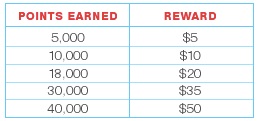
Walgreens has a new Balance Rewards shopper loyalty program as of September 2012. You can sign up for the card in store or on-line HERE. You will need the card to get sale prices at Walgreens.
Redeeming Points
When making a purchase you can choose to either redeem earned Points or continue saving Points to use on a future purchases. The more you allow points to accumulate the more points will be worth.

Redemption Dollars may not be used for the purchase of the following: dairy; liquor; tobacco; stamps; phone/pre-paid/gift cards; money order/transfers; transportation passes; charitable donations; prescriptions; pseudoephedrine or ephedrine products;immunizations, health tests or other healthcare items or services; Prescription Savings Club membership fee; Take Care Clinic services.
WALGREENS BALANCE REWARDS TIPS
  • If you signed up on-line you can still attach your account to an actual card in the store.
  • If you pay with points you still will get your Register Rewards.
  • If you pay with points for a transaction where you should earn more points you will not.
  • Manufacturer’s coupons do not interfere with any points earned.
  • Points earned show up on your receipt, making it easy to keep track!
  • If the points don’t show up, call Walgreens customer service & they’ll be credited.

Walgreens Coupon Policy

-Walgreens accepts (2) coupons on a B1G1 FREE
-Walgreens will adjust your coupon value down if the coupon exceeds the price of the item
-Walgreens accepts internet print at home coupons

Multiple Coupons

* When purchasing a single item, Walgreens accepts one manufacturer coupon and applicable Walgreens coupon(s) for the purchase of a single item, unless prohibited by either coupon offer.
* The coupon amount must be reduced if it exceeds the value of the item after other discounts or coupons are applied. (For example, a $5.00 coupon for a $4.99 item will result in a $4.99 coupon value).
* When purchasing multiple items, Walgreens accepts multiple identical coupons for multiple qualifying items as long as there is sufficient stock to satisfy other customers, unless a limit is specified. Management reserves the right to limit the quantity of items purchased.

Buy One, Get One Free Coupons

* When items are featured in a Buy One, Get One Free promotion, up to two coupons can be used against the items being purchased, as long as the net price does not go below zero for the items being purchased.

Internet/Print at Home Coupons

* Walgreens accepts valid internet/print at home coupons.

The Register Reward Programs

The Register Reward can be a great way to get items FREE or inexpensively at Wags. It can be very confusing at first but once you have the hang of it you’ll be rolling deals easily!
Register Rewards (RR) are similar to Catalina coupons, they print out of the Catalina machine after you have purchased certain qualifying products. They are manufacturers coupons intended to be used only at Walgreens (even though I have heard of other stores accepting them). They are just another way for the manufacturers to incentivize shoppers to purchase their products. They are cost effective for the manufacturer because they won’t have to pay on every one since many of them won’t be redeemed. For example if Crest is $3 and you get a $3 RR for purchasing one but never use the Register Reward, the manufacturer doesn’t have to pay the $3 on that Register Reward and you have purchased the item they wanted you to buy anyway.

How do I get a Register Reward?

There are RR deals that vary weekly, others that only last for a few days (like a 4 day sale) and still other deals last all month long. I will post all of those deals here, either in the weekly ad or under “monthly deals”.

How long are Register Rewards valid?

Generally they are good for 2 weeks from the date they are issued. Occasionally I have received a RR that was good for only 1 week. That is why you’ll want to learn how to best “roll” your register rewards.

What does “rolling” mean?

Rolling is using RR you received from buying one item or group of items, to purchase other items that give RR. So for example if Crest is $3 giving a $3 RR and Glade is $3 giving a RR then I can use the Crest to pay for Glade, Glade to pay for Crest and I can just go on “rolling”. The other benefit of “rolling” is you can extend the expiration date of a RR, giving you more time to use it towards something that you need.

Can I use a RR I received from one item to buy another of the same item?

You can but then another RR will not print. So if you want 4 Crest in the example above you are better off rolling into Glade and then using the Glade RR to buy another Crest. You could then get the 4 Crest you need. If you use the Crest $3 RR to buy another Crest another RR would not print out.

How do I know the RR is from buying a specific item just by looking at it?

Each RR will tell you what manufacturer it’s from. In the Crest example the RR would say Proctor and Gamble or P&G on it. Each RR will tell you what company it came from. If you have 2 RR from the same company but they are for different amounts you can usually roll between them.

What does it mean when you say a RR or a product is “Rolling”?

If a RR is rolling, it means it’s rolling on itself. So for example let’s say the Gillette razor RR is for $4, if it’s rolling it’s allowing you to buy another Gillette using the Gillette $4 RR and it’s producing another RR. This is unusual but occasionally it happens (most often on P&G products).

How many RR can I use in one transaction?

You can’t use more coupons in a transaction at Wags then you have items. RR are considered coupons. So if I’m buying 5 items I can only use 5 coupons or RR combined. Wags Qs don’t count towards that total.

What are fillers?

Fillers are inexpensive items that you buy so you can use more RR. So if I have 5 items I want to buy and 5 manufacturers coupons (MQ) that I want to use but I want to pay my balance with several RR I will need to get some fillers (usually items under $.50) for each RR I want to use.

Can I use a RR and a Wags Q on one item?

Yes, you can. You can stack a manufacturer coupon or a Register Reward and a Wags Q on the same item.

Is there an order in which I should hand in my RR?

I have found that the most important thing is to hand in your Wags Qs after your MQs. So MQs are always first, then RR, then Wags Qs. I have also handed in my MQ, then Wags Qs and then RR and that will work too. What you NEVER want to do is hand in your Wags Qs first!

Rite Aid Coupon Policy


The Rite Aid Coupon Policy states that Rite Aid accepts Manufacturer’s and Rite Aid coupons which means they will stack! They also have the Up + Rewards program which is another Catalina program similar to Extra Care Bucks at CVS or Register Rewards at Walgreens. Up + Rewards print at the register and can be redeemed only at Rite Aid. Like Extra Care Bucks, Up + Rewards will “roll,” or in other words you can use them to purchase the same item for which you received the Up + Reward.

You can use Rite Aid Coupons that you can get by printing them off after you have watched a video online.
These coupons are called Rite Aid Video Values Coupons and new ones come out each month. These will stack with Manufacturer’s Coupons and Up + Rewards.

Rite Aid also has another program called Single Check Rebates which are rebates you can send in online at Rite Aid after you have signed up.

In some cases, you will be able to use Single Check Rebates, Up + Rewards, Rite Aid Video Values Coupons, and Manufacturer’s Coupons all on one item which often results in FREE and Moneymaking deals!


COUPON TYPES:
Manufacturer Coupons 
Manufacturer coupons are found in newspapers, magazines and even affixed to products. The UPC on these coupons begins with a “5.”
Rite Aid Manufacturer Coupons 
Rite Aid Manufacturer coupons generally appear in our weekly circular, on our website and are sent to customers via email. These coupons are labeled “manufacturer coupon” and have a UPC that begins with “49.”
Rite Aid Valuable Coupons
Rite Aid coupons are labeled “Valuable Coupon” and have a UPC that begins with “48.”
Internet/Print at Home coupons
Rite Aid will accept internet / print at home coupons up to the equivalent value of $5.00 off.
A Rite Aid coupon (with the Rite Aid logo) is NOT considered an internet coupon (even if printed off the internet) and is therefore not subject to the $5.00 maximum.
+UP Reward Coupons
+UP Reward coupons are special coupons earned by a customer in a prior purchase that can be used for any non-prescription purchase with a small number of exclusions that are listed on the +UP coupon. Multiple +UP coupons can be used (subject to the printed exclusions) up to the amount of purchase before sales tax.
Buy One, Get One Free 
Rite Aid accepts Buy One, Get One Free coupons, however only one coupon can be used for each pair of items purchased. A customer can use one “cents off” coupon in conjunction with the item they are purchasing on a Buy One Get One Free promotion (or with a Buy One Get One Free coupon), although the value of the cents off coupon cannot exceed the selling price of the item.
Buy One Get One Free coupons cannot be used in conjunction with a Buy One Get One Free promotion.
Total Purchase Coupons
Rite Aid may feature total purchase coupons which discount the total purchase amount based upon meeting specific requirements. For example, $5 off a $25 purchase price threshold coupon.
These coupons are accepted under the following conditions:
The coupon is valid and in date; only one total purchase coupon per transaction.
Total purchase equals or exceeds $25 before tax (before any coupons are applied).
Coupons for individual items can also be used including another “48” coupon that is tied to an item in the transaction.
Provided the total of items purchased is equal to or greater than the purchase requirement, other coupons can be used in conjunction with the total purchase coupon.
ACCEPTANCE GUIDELINES:
General Guidelines:
Coupons must be valid and in date; Coupons cannot be exchanged for cash.
Register will validate coupon through scanning or keyed entry of the coupon UPC number.
In the event that any item’s selling price is less than the value of the coupon, Rite Aid will accept the coupon in exchange for the selling price of the item. Coupon redemption can never exceed the selling price of an item and no cash back is allowed.
When making a return for a product that had a coupon attached, Rite Aid cannot refund cash for the value of the coupon and cannot return the coupon that was used.
Rite Aid reserves the right to not accept any coupon where the validity or the coupon cannot be established.
Multiple Coupons 
More than one coupon can be used on the purchase of a single item under the following conditions:
All coupons match the item being purchased.
The total of the coupons is equal to or less than the selling price of the item before sales tax.
No more than one “48” Rite Aid Valuable coupon, one “49” Rite Aid Manufacturer coupon, and one “5” Manufacturer coupon can be used on a single item. Rite Aid may accept up to 4 identical coupons for the same number of qualifying items as long as there is sufficient stock to satisfy other customers within the store manager’s sole discretion.

Kroger Coupon Policy


The Kroger Coupon Policy states that all divisions and subsidiaries of Kroger accept industry standard printable coupons. Our Kroger Deals are based out of the stores in Central Arkansas and these stores will double coupons up to $0.60 but they will not double internet printed coupons. Many other Kroger Stores double coupons up to $0.50 and doubling is the best way to save money when you shop there! What will really save you money is when you can stack Kroger Store Coupons with Manufacturer’s Coupons. You can find Kroger Coupons in mailers, publications, and in their Kroger Ad.
According to the Kroger Coupon Policy, you may also use a Kroger Plus Card which you can download Digital Coupons to and there is a limit of 150 Digital Coupons can be loaded at a time. These coupons will automatically be redeemed when you use your card at checkout which is good to keep in mind. You can find all of the information on how to use the Kroger Plus Card at the Kroger Digital Coupon Policy.
Kroger does not accept coupons if that coupon’s value exceed 75% off the price of the item being purchased.


Effective November 2007, all Kroger divisions accept industry-standard, secure print-at-home coupons. We recently partnered with Coupons Inc., the industry leader in print-at-home coupons, to offer print-at-home coupons on Kroger.com and all of our store banner websites. You may also find coupons on brand websites and legitimate coupon websites like Coupons.com. Help us make your shopping experience a pleasant one by keeping in mind these simple rules for using Print-At-Home coupons.
We can only accept print-at-home coupons if they scan properly at checkout. Legitimate printable coupons are delivered using special software designed to print a properly rendered barcode on the coupon and limit the number of coupons printed.
We will generally not accept “FREE product” (no purchase required) print-at-home coupons. It is currently an industry practice not to produce print-at-home manufacturer’s coupons for free product. Buy-one-get-one-free coupons and other values that have a purchase requirement are acceptable.
We will usually not accept coupons for more than about 75% of a product’s value. For example, a $2 off coupon will be acceptable for a product that normally sells for $5 or more, but a $2 off printable coupon for a product that sells for $2.25 is unlikely to be legitimate. If there are exceptions, we are usually provided advance notice by the manufacturer.
Coupons will be rejected if they appear distorted or blurry, altered in any way, or are obvious duplicates. You should always print the coupon yourself directly from the website or email that is offering it. Only then can you ensure you are printing a legitimate coupon. The coupon will never appear on your computer screen. A legitimate coupon is never sent as a graphic or PDF or sent in a Word document.
Print-at-home coupons should never be copied, sold, or traded. They should not be photocopied or scanned and distributed to others. They have unique serial numbers printed on them and follow an industry-standard format. Coupons are never sold and you should not pay for someone’s “time to clip” or other service fee.